- AI
- Security
Is your data safe when you use AI? What Claude, OpenAI, Google, and Meta do with it
Most AI data leaks don’t come from a hacked AI provider. They come from the wrong account, the wrong setting, or a careless share. Here is what Anthropic, OpenAI, Google, and Meta actually do with your data, what happens when your files are turned into vectors or read by OCR, and how we protect what you put into our products.
3rdLoop Solutions
· 12 min read
“Is it safe to put this into AI?” is the question we hear most often, from clients, from founders in 3C, and from our own families. It usually comes with a specific fear: that a contract, a payslip, or a customer list typed into a chatbot will turn up in someone else’s answer, or in the next data breach.
The worry is reasonable. Most of the time, though, it is aimed at the wrong place.
This article explains what the four biggest AI providers do with your data: Anthropic (Claude), OpenAI (ChatGPT), Google (Gemini), and Meta (Meta AI and Llama). It covers where AI data leaks actually come from, what happens when your files are turned into vectors or read by OCR, and how we handle all of it in our products.
These are the providers’ published policies as of September 2026. They change, sometimes quickly. Check the current terms before you rely on any single detail.
The short answer
- The version you use matters more than the brand. Every provider here offers a business version that isn’t trained on your data, and a consumer version that may be.
- Most leaks aren’t hacks of the AI provider. They come from people using personal accounts for work, from sharing settings, and from the other companies around the AI.
- Training and breaches are different risks. Business terms remove the first. Good security, on your side and the provider’s, reduces the second.
- Files turned into vectors are still sensitive. A vector isn’t anonymous. Protect it like the document it came from.
Two risks people mix up
When people say “AI data breach,” they usually mean one of two things.
Training. The provider uses your conversations to improve its future models. The fear is that the model learns something from you and repeats it to a stranger. Models can memorize parts of their training data, so this isn’t imaginary. It is rare, though, for a single conversation to come back out in a form anyone would recognize. The simple fix is to use a version that isn’t trained on your data.
Exposure. Your data is stored somewhere, such as chat history, logs, a shared link, or a vendor’s system, and someone who shouldn’t see it does. This is the same risk you already manage with email, cloud storage, and accounting software, and you manage it the same way: know where the data is kept, for how long, and who can reach it.
Business terms answer the first risk directly. The second depends on retention, access controls, and the people using the tool.
What each provider does with your data
Anthropic (Claude)
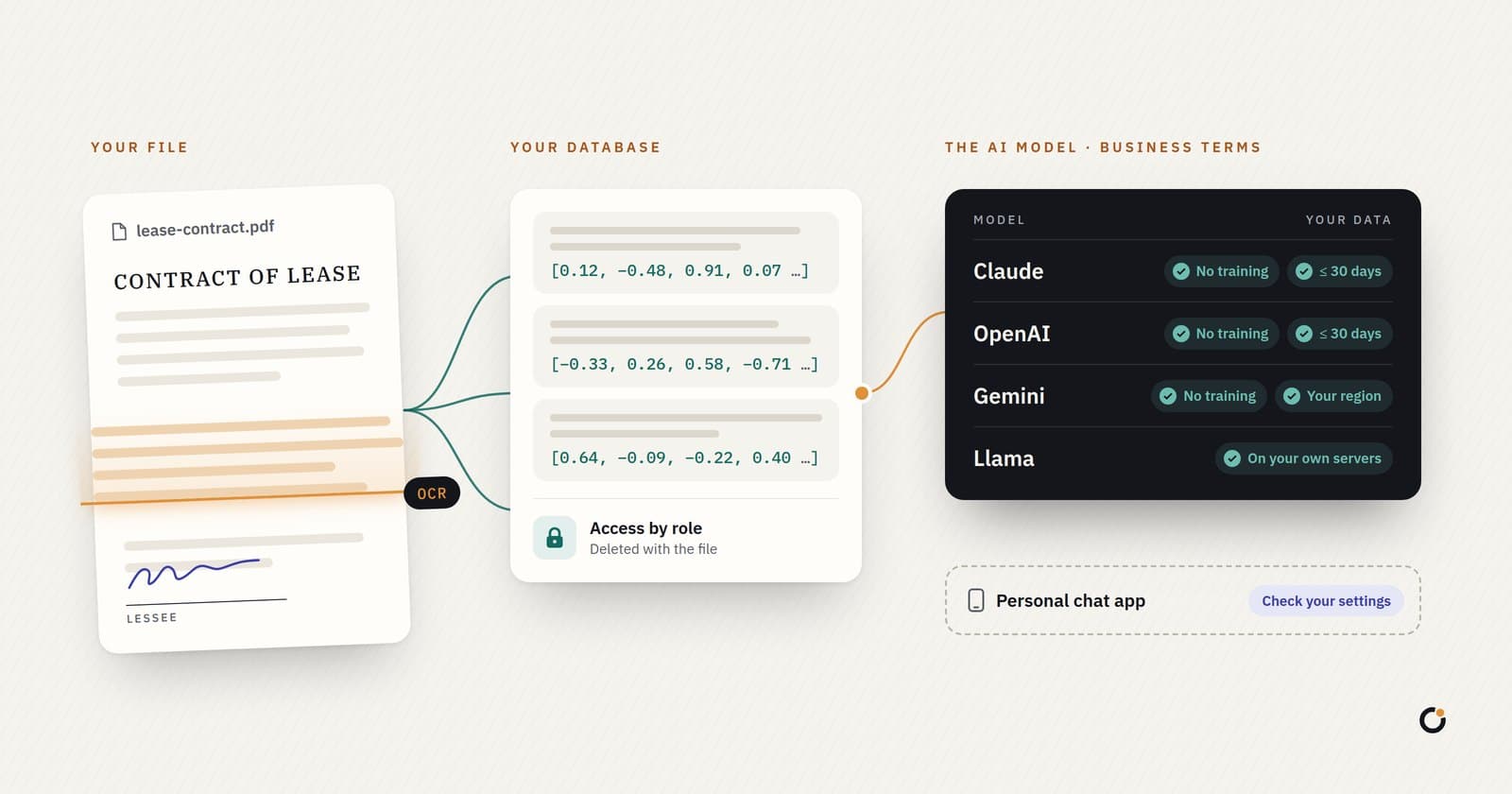
- Business use (the Claude API, and the Team and Enterprise plans): Anthropic’s commercial terms say it may not train models on customer content. API inputs and outputs are deleted within 30 days by default. Qualifying enterprise customers can sign a zero data retention agreement, under which prompts and responses aren’t stored after the response is returned.
- Personal use (Claude Free, Pro, and Max): since late 2025, you choose whether your chats can be used to improve Claude. If you allow it, Anthropic may keep that data for up to five years. If you don’t, the standard 30-day deletion applies. Content flagged for breaking the usage policy can be kept longer.
OpenAI (ChatGPT)
- Business use (the API, ChatGPT’s business and Enterprise plans, and Edu): not used to train OpenAI’s models by default. API data is kept for up to 30 days for abuse monitoring and then deleted. Eligible customers can get zero data retention.
- Personal use (Free, Plus, and Pro): your chats may be used for training unless you turn off “Improve the model for everyone” in Data Controls. Temporary Chats aren’t used for training and are deleted after 30 days.
- A lesson from 2025. In the New York Times copyright case, a US court ordered OpenAI to preserve consumer and some API conversations, including chats users had deleted. OpenAI says the order stopped applying to new conversations on 26 September 2025, and that ChatGPT Enterprise, Edu, and API customers with zero data retention were never covered. The lesson applies to every provider: a court order can override a deletion schedule. With zero retention, there is nothing stored to hold.
Google (Gemini)
- Business use (the paid Gemini API, Vertex AI on Google Cloud, and Gemini in Google Workspace): not used to train models. Cloud use falls under Google Cloud’s data processing terms, and Vertex AI lets you choose where data is processed. Prompts may be logged for a limited period for safety and abuse detection. For Workspace customers, Gemini in Gmail, Docs, and Drive doesn’t use your content to train or improve its models.
- The free Gemini API tier is different. On the free tier of Google AI Studio and the Gemini API, Google may use what you send to improve its products, and human reviewers may read it. That is fine for testing with made-up data. It is the wrong place for a real customer’s file.
- Personal use (the Gemini app on a personal Google account): activity is kept for 18 months by default, which you can change, and may be used to improve Google’s models. Human reviewers read a sample of chats, and those are kept for up to three years, separated from your account. If you turn activity off, chats are still kept for up to 72 hours to run the service and keep it safe.
Meta (Meta AI and Llama)
Meta offers two very different things.
- Meta AI, the assistant inside Facebook, Instagram, WhatsApp, and Messenger, is a consumer product. Since 16 December 2025, Meta has used your conversations with it to personalize the content and ads you see. At launch this excluded the EU, the UK, and South Korea, so it applies in the Philippines. The only way to opt out is not to use Meta AI. Meta says it won’t use sensitive topics, such as health, religion, or political views, to target ads. In 2025, some users of the Meta AI app also published private chats to its public Discover feed by mistake.
- Llama is a family of open-weight models. A company can download them and run them on its own servers, so no data goes to Meta at all. You can also use Llama through cloud providers such as AWS, under that provider’s terms. Meta says its own Llama API doesn’t use prompts and responses to train models.
For personal privacy, Meta AI calls for the most care. For a company whose data must stay in-house, Llama and other open models are among the safest options, because they can run where the data already lives.
Where AI data leaks actually come from
Look at the AI data incidents that made the news and a pattern appears: very few involved an attacker breaking into a model provider.
- Work data in personal accounts. In 2023, Samsung engineers pasted confidential source code and meeting notes into ChatGPT, and Samsung restricted staff use of generative AI. The tool worked as designed. The mistake was putting company data into a consumer account.
- Sharing settings. In mid-2025, thousands of shared ChatGPT conversations appeared in Google search results because users had ticked a “make this chat discoverable” box. OpenAI removed the option on 31 July 2025. The same year, Meta AI users published private chats to a public feed without realizing it.
- Other companies around the AI. In November 2025, an attack on Mixpanel, an analytics vendor OpenAI used, exposed limited profile information about some API users, such as names and email addresses. OpenAI said no chats, API requests, passwords, or API keys were exposed, and it stopped using the vendor.
- Bugs. In March 2023, a bug in an open-source library let some ChatGPT users see the titles of other users’ conversations for several hours, and exposed limited payment details for about 1.2% of Plus subscribers.
The reassuring part is that you can plan for every one of these. Use business accounts for work, check sharing settings, and ask providers which other companies handle your data. None of these incidents requires anyone to stop using AI.
What happens when your files are turned into vectors
Many AI products, ours included, let you ask questions about your own documents. To do that, the system first turns each document into something it can search by meaning. This is called embedding, or vectorizing.
It works in four steps:
- Extract the text from the file. For a scan or a photo, this is where OCR comes in.
- Split the text into chunks of a few paragraphs each.
- Turn each chunk into a vector, a long list of numbers that captures what the chunk is about. An embedding model does this.
- Store the vectors in a database, next to the chunks they came from. When you ask a question, the system turns your question into a vector too, finds the closest chunks, and gives only those to the language model to write an answer from.
What this means for security:
- Making vectors means sending text to a model. If the embedding model is a cloud API, such as OpenAI’s or Google’s, your text goes to that provider under the same business terms as any other API call: no training, and deletion on the normal retention schedule. If the embedding model runs on your own servers, the text doesn’t leave. Good open embedding models run on ordinary hardware.
- A vector isn’t anonymous. It looks like meaningless numbers, but researchers have shown that the original text can often be rebuilt from it. One 2023 study recovered 92% of short passages word for word, and full names from clinical notes. Treat vectors as sensitive as the documents they came from.
- Vectors are stored, so they need access rules. Vectors and chunks usually live in a database run by the product you use, not by the AI provider. That database needs the same protection as any other: encryption, access limited by customer and by role, and reliable backups.
- Search must respect permissions. If several customers or departments share one system, a search must only look through documents the person asking is allowed to see. Otherwise the AI can quote a document to someone who could never have opened it.
- Deleting a file must delete everything made from it: the original, the extracted text, the chunks, and the vectors. If a product can’t tell you that it does, ask.
What happens when a document goes through OCR
OCR (optical character recognition) turns a scan, a photo of a receipt, or an image-only PDF into text. Many PDFs don’t need it at all. If you can select the text in a PDF, open-source tools on the server can read it directly, and nothing goes to an outside service.
When OCR is needed, there are two main routes.
Cloud OCR, such as Google Cloud’s Document AI and Cloud Vision. These are business services. Google says customer data sent to them isn’t used to train its models, processing falls under Google Cloud’s data processing terms, and Document AI lets you choose the region where documents are processed. Cloud OCR is usually the most accurate option for difficult documents: handwriting, poor scans, and complex forms. Other clouds offer similar services under their own terms, and those terms differ. Some AWS AI services, for example, may use content to improve the service unless the account opts out. Read the terms for the exact service you use.
Local OCR, such as the open-source Tesseract engine, runs on your own servers. Nothing leaves, but it is less accurate on messy documents.
One common confusion: Google Lens, Google Photos, or a photo pasted into a free chatbot are not the same as Google Cloud OCR. They run under consumer terms. The technology may be similar, but the promises about your data are not.
Whichever route you use, ask the same questions. Where is the document processed? Is it stored afterward? Is it used for training? Is the extracted text protected as carefully as the original file?
How we protect your data in our products
Batayan, ariarian.ai, Habi, and 3C are built on the same kinds of models described above. This is how we use them.
- Business terms only. Our products reach AI models through the providers’ business APIs and cloud services, under terms that don’t allow training on your data. We don’t send customer data to consumer apps or free tiers.
- The right provider for the data. We choose a model for each task based on accuracy, cost, and where your data is allowed to go. For enterprise and custom deployments, we can route only to the providers and regions your policies allow, or run open models on infrastructure you control.
- Your files and vectors stay under your access rules. Uploaded files, extracted text, and vectors are protected by the same access rules, which live in the database and are tested. A search in your workspace only looks at your workspace’s documents.
- No new provider without terms in place. Nothing from a customer workspace goes to a new AI provider until the data processing terms are in place.
- You own your data. We handle personal data under the Data Privacy Act of 2012 (Republic Act No. 10173). Each product has its own privacy policy that explains what it collects and why.
- A person stays accountable. Our software handles routine work, escalates what matters, and records how each decision was made. That record also lets us answer the question that matters after any incident: who saw this, and when?
No one can honestly promise that a system, AI or not, will never be breached. What we can promise is that we know where your data goes, we keep that list short, and we will tell you what is on it.
A checklist for companies
- Give your team an approved AI tool on a business plan. People will use AI anyway. If the only option is a personal account, that is where your data goes.
- Check four things in the terms. Is your data used for training? How long is it kept? Where is it processed? Is there a data processing agreement?
- Decide what never goes into an outside AI, such as government ID numbers, medical records, or passwords. Redact it, or use a model that runs in-house.
- Turn off public sharing where your admin console allows it.
- Treat vectors and OCR text like the originals, and make sure deletion covers them.
- Update your privacy notice. The National Privacy Commission’s guidelines on AI (NPC Advisory No. 2024-04) expect organizations to tell people when AI processes their personal data, and to respect their rights to object, correct, and erase it.
A checklist for personal use
- Turn off training if you don’t want it: “Improve the model for everyone” in ChatGPT, the model improvement setting in Claude’s privacy settings, and Gemini’s activity setting.
- Use temporary or incognito chats for anything sensitive.
- Look before you tap Share. Anyone with a shared link can read it.
- Keep work data in work tools. Your employer’s approved AI tool has stronger protections than your personal account.
- Never paste passwords, one-time PINs, or full card or bank details into any chatbot.
- Be careful with Meta AI. Assume what you tell it can shape the ads you see.
The bottom line
The AI tools from Anthropic, OpenAI, Google, and Meta aren’t unusually dangerous places for your data. Their business versions come with the same kinds of commitments you already expect from the cloud services that hold your email and files. The real risks are ordinary ones: the wrong account, a careless share, a long retention period, or a database without good access rules. You can manage every one of them.
If you want help deciding what your team can safely put into AI, or you want to see how one of our products handles your data before you commit, contact us.
Provider policies are summarized from each company’s published terms, help pages, and announcements as of September 2026, linked above. They change often; the provider’s current terms always take precedence over this summary. This article is general information, not legal advice.